
Top 10 Outdoor Digital Advertising Screens for Maximum Impact
2026-09-25
Outdoor digital advertising screens have moved way past flashing static images. Today they're dynamic, data-driven, and impossible to ignore. But with so many options flooding the market, picking the right one for maximum impact can feel like a gamble. That's why we've narrowed it down to the top 10 screens that actually deliver—whether you need ultra-bright displays for full sun or rugged panels for harsh weather. And if you're looking for a partner that understands high-performance outdoor displays inside out, zemso has you covered. Here's what makes these screens stand out.
LED, LCD, or Projection: Which One Holds Up When the Weather Turns Ugly?
When rain starts hammering down and the temperature swings wildly, most display technologies start to show their weaknesses. LCD panels can suffer from condensation and sluggish response in cold weather, while projectors need almost perfect conditions to throw a visible image outdoors. LED screens, on the other hand, are built for exactly this kind of abuse—sealed modules and wide operating ranges let them shrug off downpours and dust storms.
There’s a reason outdoor stadiums and highway billboards almost always rely on LED. Not only do individual diodes stay bright in direct sunlight, but the lack of a fragile backlight or delicate optics means fewer points of failure when wind, hail, or salt spray enters the picture. An LCD might survive a light drizzle if it’s housed in a weatherproof enclosure, but once moisture creeps inside, you’re looking at fogged screens and dead pixels. Projection simply isn’t a realistic option unless you can guarantee a controlled environment—rain, fog, or even heavy humidity will wash out the image or damage the lens.
So if you need something that can take a beating from Mother Nature and still deliver a readable picture, LED wins almost every time. That doesn’t mean LCD or projection have no place—they’re fine for sheltered patios, indoor signage, or short-term setups under a canopy. But when the forecast turns properly ugly, the technology that keeps shining is the one with no moving parts, no liquid crystal layers, and no lamp to burn out.
Where You Mount the Screen Decides More Than What You Put on It
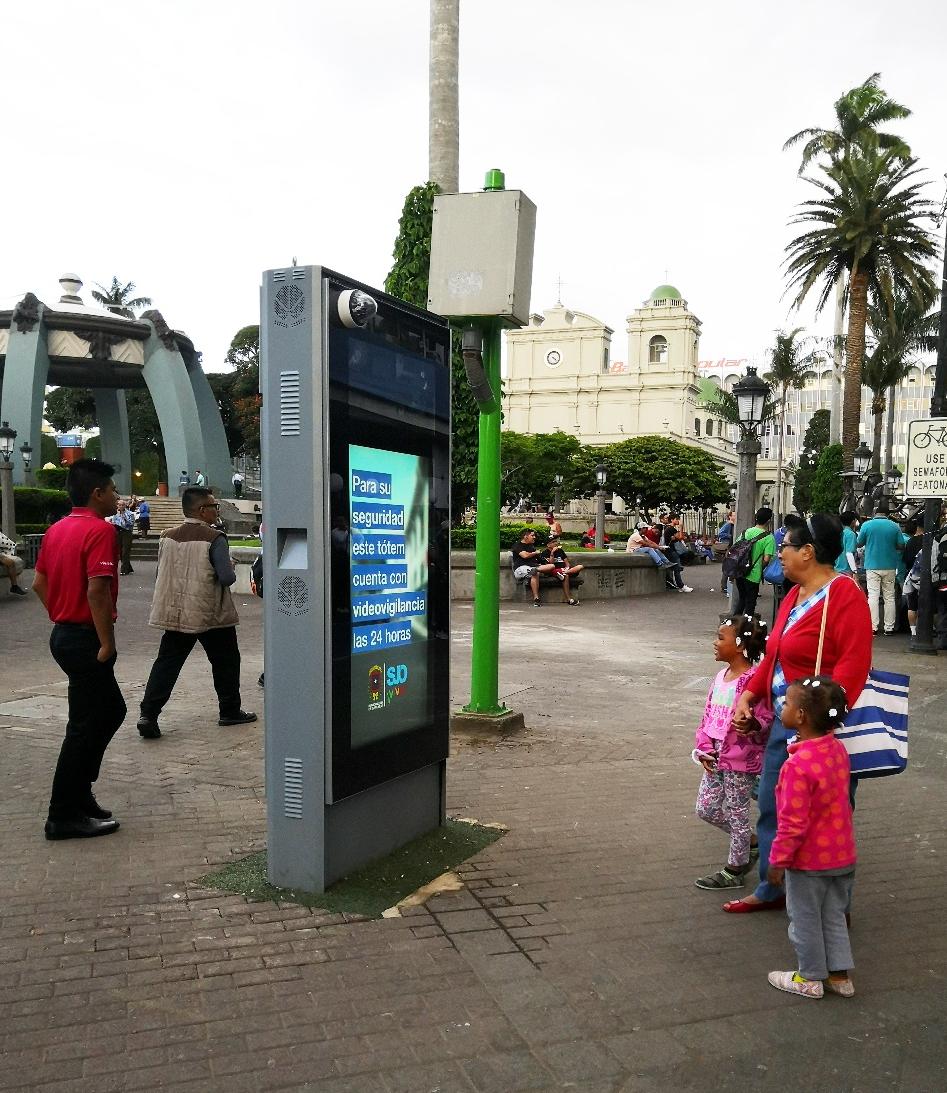
Most people obsess over resolution, refresh rates, or what wallpaper to use, but the spot where a screen lives changes everything before a single pixel lights up. Mount it too high and your neck pays the price; tuck it into a corner and half the room stops watching. Placement sets the physical relationship between the viewer and the display, and that relationship quietly controls comfort, glare, and whether anyone actually wants to look at it for more than five minutes.
A screen above a fireplace might look stylish in a photo, but it forces an upward angle that drains attention and turns casual viewing into a chore. Move that same panel to eye level on an adjacent wall, and the room suddenly feels more open, conversations stay relaxed, and the content becomes easier to absorb. The wall, the height, the distance from seating—these choices shape how the space functions far more than the apps or menus you load later.
There’s also a quiet social effect. A screen placed at the center of a room demands attention, while one mounted off to the side stays available without dominating. That single decision can make a living room feel like a theater or a waiting room. Before picking what to display, figure out where the screen should live—because the location determines whether the content gets a fair chance at all.
Noon Sun Is the Real Test: Brightness and Contrast That Beat the Glare
Plenty of panels claim impressive brightness, but the moment direct sunlight hits the screen, most of them wash out into a hazy, unreadable mess. The real challenge isn't hitting a high nit count in a dark room—it's maintaining clarity and contrast when the sun is beating down from overhead. That's exactly where this display pulls ahead. Instead of just cranking up the backlight, it combines a high-brightness panel with an anti-glare coating that scatters harsh reflections without muddying the image. The result: text stays sharp, colors keep their punch, and you can actually see what's on the screen without cupping your hands around it like a makeshift visor.
Outdoor readability goes beyond raw luminosity. Many bright screens look impressive on a spec sheet but fall apart under real noon light because their contrast ratio collapses—blacks turn gray, fine details disappear, and the whole picture flattens into a foggy glow. This approach is different. The panel maintains a deep black level even at maximum brightness, so icons, maps, and photos retain their depth. Shadows don't become smudges, and highlights don't blow out into blobs of white. You notice it most when glancing at the screen for a quick direction check or a camera preview: there's no squinting, no tilting the device back and forth, just a clear view the first time.
It's not about winning a brightness war on paper. It's about being usable in the one place that exposes weak displays instantly—outside, under a cloudless sky, with the sun directly above. Whether you're navigating a trail, reading a notification on a bike mount, or just checking the time in a park, the screen should feel like it belongs there. Harsh reflections fade to the background, and the content stays front and center. That's the kind of performance you don't appreciate until you've been burned by a screen that promises sunlight readability and delivers a mirror.
You Have Three Seconds: Crafting Outdoor Content That Stops Foot Traffic
Three seconds is how long you have before a passing stranger decides whether to glance at your outdoor sign or walk right past. That's not much time, so every visible element has to earn its spot. A chalkboard outside a café that reads "Your phone needs caffeine too" will stop more people than one that simply says "Fresh Coffee." The first version understands that the person walking by is more concerned with their own world than with your product. Speak to that world, and their feet slow down.
What actually halts someone mid-stride is rarely a polished logo or a generic welcome message. It's usually an unexpected image, a bold color block, or a benefit so immediate they can almost feel it—like "Cold drinks 10 steps away" on a blazing afternoon. Keep the message short enough to read while moving, and avoid trying to say everything. One clear promise, one visual jolt, and a reason to act now beats a paragraph of details every time.
After you put something up, stand across the street and watch. Count how many heads turn, how many steps slow. If the number isn't high enough within the first few minutes, change the wording or the placement. Outdoor content isn't about being clever for its own sake; it's about creating that small pause that gives you a chance to start a conversation.
Budget Screens Break in Public: The Hidden Costs of Going Too Cheap
Cheap screens have a way of failing at the worst possible moment — during a live presentation, in a busy retail window, or on a trade show floor. The first casualty is usually the image itself: washed-out colors, uneven backlight bleeding, or a refresh rate that turns smooth motion into a stutter. But the real damage goes beyond pixels. When a display flickers or dies in front of an audience, it quietly erodes trust. Clients don't remember the money saved on hardware; they remember the awkward silence while someone taps the screen and apologizes.
Then there's the repair cycle. Budget panels often use lower-grade capacitors and thinner thermal shielding, which means heat builds up faster and components fail sooner. What starts as a bargain turns into a recurring expense: service calls, spare parts, lost uptime. In public spaces, downtime isn't just inconvenient — it's visible. A blank screen above a checkout counter or a frozen menu board at a drive-thru sends a message that the business is cutting corners. That perception can cost more than the price difference between a budget and mid-range panel.
Warranty terms tell the same story. Many ultra-cheap displays come with short coverage windows or require shipping the unit back for weeks. Meanwhile, a public-facing screen sits dark, and every day of downtime chips away at revenue or foot traffic. The hidden cost is not in the initial invoice but in the compromises: lower brightness for sunlight readability, narrower viewing angles for passersby, and weaker bezels that crack under accidental bumps. Going too cheap doesn't save money — it just moves the expense to a more embarrassing time and place.
Rain, Heat, and Dust: How to Keep Your Screen Alive Without Daily Fixes
Rain doesn't have to mean a fogged-up or short-circuited display. A breathable, water-resistant cover can shed most moisture while letting internal humidity escape, so you're not peeling it off every morning to wipe condensation. Seal cable entry points with outdoor-rated grommets and angle the screen slightly downward—gravity handles the rest.
Heat is the silent killer of backlights and solder joints. Instead of running the panel at full brightness all afternoon, set an automatic brightness curve that drops to about 70% during peak sun hours. A simple aluminum shade hood extending just past the screen's top edge cuts direct solar gain without trapping heat, and if the enclosure has a small vent at the bottom and top, convection does the cooling work for you.
Dust buildup forces you into a cycle of wiping and eventual pixel burnout. Swap open-frame mounts for a sealed bezel with a gasket, and add a thin, washable foam pre-filter over any air intake. You'll only need to rinse that filter once a month, not touch the screen itself—by then the rain, heat, and dust are someone else's problem.
FAQ
Focus on brightness and contrast more than resolution. A screen that can hit at least 5,000 nits will stay readable under direct sunlight, while high contrast prevents colors from washing out. Also look at weatherproofing ratings—IP65 or higher keeps dust and rain out. The viewing distance matters too: a pixel pitch of 10mm works fine for people 10 meters away, but you'll need 4mm or less if pedestrians are closer.
Not always. LED panels handle direct sunlight and wide viewing angles better, which makes them the default for large roadside displays. But for covered areas like transit shelters or shopping mall entrances, a high-brightness LCD can offer sharper text and more flexible content layouts at a lower upfront cost. The real question is whether the screen will face full sun or sit in partial shade.
Set up a content calendar with slots for static images, short video loops, and real-time feeds like weather or transit updates. Many outdoor screen platforms let you schedule content remotely and pull from a media library, so a small team can rotate three or four campaigns in advance. The trick is to design each piece in short bursts—six seconds or less—because viewers are usually moving.
Cramming too much text or too many messages into one loop. Outdoor viewers often have less than three seconds of attention, so a single bold headline and one clear action work far better than a slideshow of five different offers. Another common error is ignoring the screen's physical surroundings—if it's next to a traffic light, drivers will only glance during red, so keep the main message visible in the first second.
Generally no. Indoor screens are not built to handle temperature swings, direct UV exposure, or humidity, even with an enclosure. Condensation can form inside the housing and damage electronics. If budget is tight, look for semi-outdoor or high-brightness window-facing displays instead—they're designed for partial exposure and cost less than full outdoor LED cabinets.
Placement dictates both viewing distance and dwell time. A screen above a highway needs large text and simple animations because viewers are moving at speed and may only have two seconds. A screen at a bus stop, where people wait several minutes, can carry more detailed messages, countdown timers, or QR codes. Always walk the site and observe how people actually pass by before finalizing content.
Check the cooling system and air filters every month, especially in dusty or coastal areas. Clean the glass or LED surface with approved non-abrasive cleaners to avoid scratching anti-reflective coatings. Monitor power draw and temperature remotely so you catch failing components before they cause a full outage. Keep spare modules and power supplies on hand—repairs should take hours, not days.
Use the screen as a real-time community board showing local transit arrivals, weather, or event schedules between ad slots. You can also run interactive campaigns triggered by motion sensors—like a screen that reacts when someone walks by. At night, switch to high-contrast dark backgrounds with glowing text, which looks more dramatic and saves energy compared to full white backgrounds.
Conclusion
When it comes to outdoor digital advertising, the screen you pick isn't just a display—it's a piece of street furniture that has to survive everything from sideways rain to a noon sun that turns most panels into unreadable mirrors. LED, LCD, and projection each have their defenders, but the moment the weather turns ugly, the differences stop being technical and start being financial. A cheap screen that dies after one dust storm or one heat wave isn't a bargain; it's a public embarrassment that costs more in repairs and missed impressions than the premium panel you should have bought in the first place. And where you mount that screen matters just as much as what you put on it. A panel hidden behind a bus shelter or angled into a glare pocket will never earn its keep, no matter how clever the creative is.
Brightness and contrast are the real tests when the sun is high and the sidewalk is full of squinting pedestrians. You have about three seconds to stop someone mid-stride, which means your content can't be a repurposed TV spot with tiny text and slow fades. It has to be built for the environment: bold, high-contrast, and immediately legible. And if you want that screen to keep working without a daily maintenance crew, you need to think about rain, heat, and dust before they become problems. Sealed enclosures, proper ventilation, and remote monitoring aren't luxury add-ons—they're the difference between a screen that runs for five years and one that becomes a very expensive blank rectangle after its first summer storm.
Contact Us
Contact Person: Leo
Email: [email protected]
Tel/WhatsApp: +86 18901905138
Website: https://www.zemsogroup.com/